JARVIS for Windows — Installed, Not Imagined.
DIGI BIZ OS is a Windows application, not a browser tab. Install it on Windows 10 or 11, activate your licence and start giving spoken instructions that touch your real files, applications, terminal and documents.
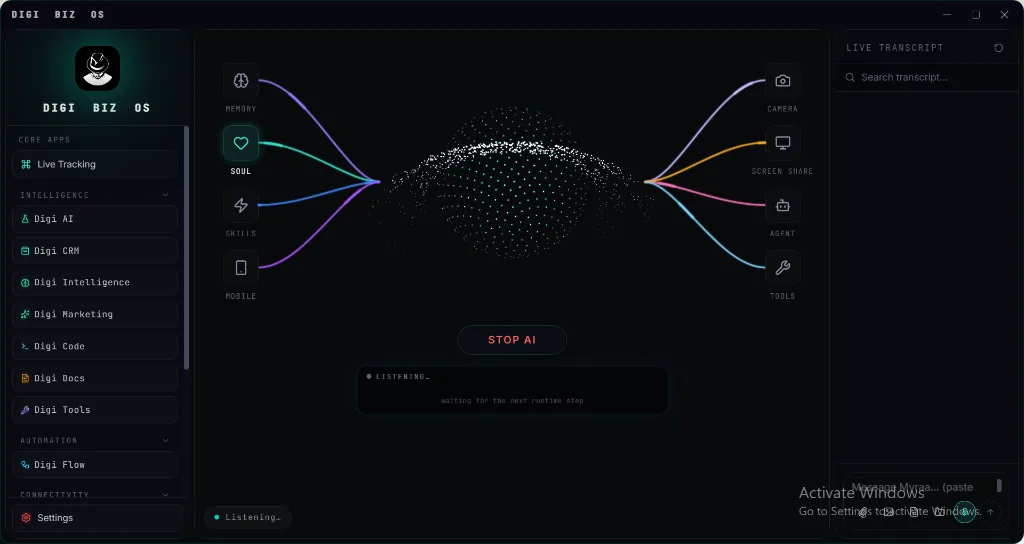
Experience JARVIS for Windows In Action
Switch between capabilities below to inspect the live execution telemetry, parameter rules, and instant desktop output.
Native install
A real Windows application with a full workspace UI.
$ digi-biz-os --module="native-install" --listen
✔ Module verified: SHA256 integrity passed. Local encrypted database mounted.
⚡ Voice Assistant standby in prompt box. Neural orchestrator attached.
Native C++ / Python Core
Runs offline on your hardware without subscription tokens.
DIGI Universal Bus
Coordinates with CRM, Studio & WhatsApp pipelines.
Engineered for Sovereignty, Speed & Power
Why settle for sluggish browser tabs and monthly subscription lock-in? See what happens under the hood of DIGI BIZ OS.
$ digi run --task="autonomous-dispatch" --target="jarvis-for-windows"
[SYS] Loading native C++ modules... OK (12ms)
[AI-BRAIN] Reasoning pass complete: 90%+ modules connected.
[VOICE] Prompt box listening for user voice commands.
[SUCCESS] Operation completed without external network transmission.
Zero Cloud Latency & Terminal Power
Direct hardware access allows DIGI BIZ OS to manipulate local files, execute shell workflows, and coordinate database queries instantly — without waiting for cloud round-trips.
Multi-Agent Background Brain
Every task is planned by an intelligent reasoning core before a single line of code or script touches your operating system.
✔ 100% Offline native execution on your PC.
✔ No per-seat fees or recurring subscription traps.
✔ Sensitive client records never leave your local SSD.
✔ BYO wholesale AI keys or run free Ollama offline.
Direct Metal
Hardware accelerated video, AI & local database engines.
Private Disk
Zero diagnostic data or user telemetry uploaded.
Engineered for High-Consequence Work
Whether managing enterprise client ledgers, executing legal contracts, or rendering high-res media, DIGI BIZ OS operates inside a sovereign Windows desktop boundary.
How JARVIS for Windows Executes On Your Machine
From voice instruction to local database write and final deliverable — with zero cloud lock-in.
Voice Prompt or Natural Brief
Speak directly into the prompt box or type in plain language. Built-in Whisper engine transcribes in real-time.
AI Brain Intent & Planning
The background AI reasoning engine decomposes the goal, checks the Business Knowledge Base, and builds a verified multi-step execution graph.
Local Hardware Sandbox Run
Commands execute natively on your PC: querying your secure local database, calling offline media & AI engines, or operating files with zero cloud latency.
Verified Delivery & Ledger Sync
Final PDF invoice generated, video rendered, or CRM pipeline updated. Telemetry log saved to your local disk.
Straight answers
- Which Windows versions are supported?
- Windows 10 and Windows 11. macOS, Linux and a mobile companion are marked coming soon.
- How do I install it?
- Download the installer, run it, then activate with the licence key emailed after purchase. Setup usually takes a few minutes.
- Does it control the desktop?
- Yes — with your permission it can work with applications, files, folders, clipboard and system actions.
Live Software Interface: JARVIS for Windows
Explore actual screenshots of the running software. Every interface below is built natively into DIGI BIZ OS with zero cloud dependency and zero monthly subscription bills.
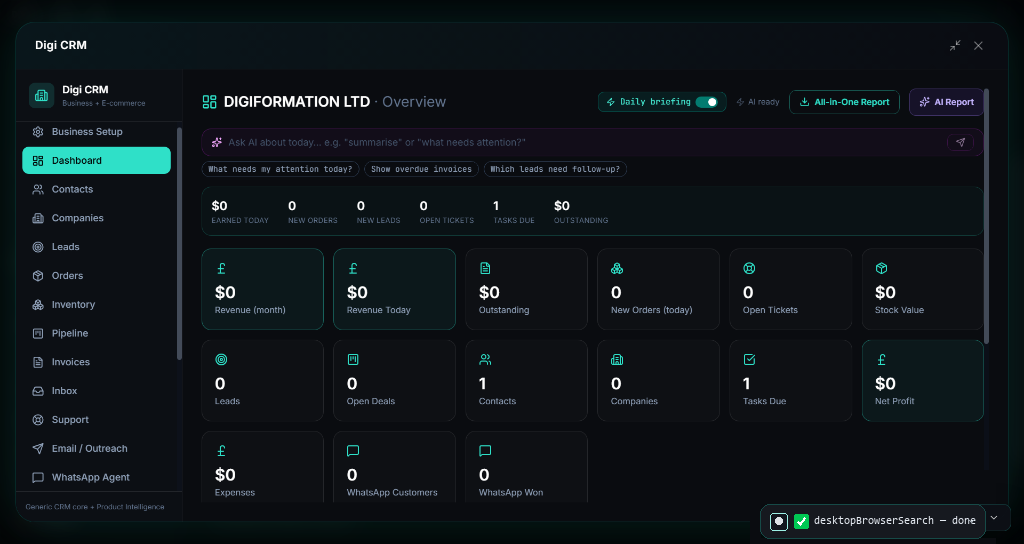
Executive Pipeline & Real-Time Orders Command
Live financial pulse, lead stages, and revenue metrics in 1 dashboard
The core nerve center of your enterprise. Tracks total order flow, overdue invoice stages, live customer acquisition funnels, and daily automated AI executive briefings with zero latency.
Why Pay Subscriptions? JARVIS for Windows Is Included 100% Free
Commercial SaaS vendors charge recurring subscriptions and per-minute rendering fees for these individual tools. With DIGI BIZ OS, every capability below runs natively on your Windows PC with 100% Free Lifetime Access.
| Market Paid Tool & Vendor | Commercial Cost | DIGI BIZ OS Native Capability | DIGI BIZ OS Price |
|---|---|---|---|
CapCut Pro & Adobe Premiere Pro ByteDance / Adobe | $20/mo ($240/yr) | Timeline Video Editor (Reels, Shorts, 4K Cuts)
| 100% Free (Included)Save +$$240/yr |
ElevenLabs Pro & Murf AI ElevenLabs / Murf | $22/mo ($264/yr) | Multilingual Voice TTS & Audiobook Factory
| 100% Free (Included)Save +$$264/yr |
HeyGen & Synthesia HeyGen / Synthesia | $29/mo ($348/yr) | AI Avatar Studio & Presenter Synthesis
| 100% Free (Included)Save +$$348/yr |
Descript Pro & Otter.ai Descript / Otter.ai | $12/mo ($144/yr) | Offline Speech-to-Text & Subtitle Generator
| 100% Free (Included)Save +$$144/yr |
Topaz Gigapixel & Photoroom Pro Topaz Labs / Photoroom | $13/mo ($156/yr) | AI Photo Studio & 4K/8K Image Upscaler
| 100% Free (Included)Save +$$156/yr |
Frequently asked
- Is there a macOS version?
- Not yet — macOS is listed as coming soon on the home page.
- Can it run at startup?
- Yes, it can stay resident so background workflows and voice control are always available.