Digi Flow — Always-On Business Automations & Visual Multi-Step Task Pipelines
Digi Flow is the central workflow automation and background task execution engine of DIGI BIZ OS. It features always-on business rules that automatically monitor operations—such as chasing overdue invoices, triggering low-stock reorders, sending stalled deal reminders, and escalating customer tickets—alongside a visual multi-step flow runner for custom business routines with zero monthly Zapier or Make subscription fees.
Included in DIGI BIZ OS • Windows 10/11 • 100% Local Privacy • Zero Subscription Fees
Target Operating System
Windows 10 / Windows 11 (64-bit)
Execution Architecture
Local Native Binary + Air-Gapped Option
Licensing & Pricing
One-Time Lifetime (£29) — $0 Monthly Fees
Desktop Integration Synergy
Integrates with Graphviz for workflow topology visualization and local encrypted storage for permanent execution transcript auditing.
Business Problems Solved
- Replaces recurring monthly Zapier or Make costs with 100% free, unlimited local workflow execution.
- Eliminates operational forgetfulness by automatically checking for overdue invoices, stalled deals, and low inventory 24/7.
- Ensures business reliability: if any step in a multi-stage flow encounters an error, execution stops safely and alerts you immediately.
- Executes scheduled tasks reliably on your Windows machine without requiring browser windows to stay open.
Who Is This Built For?
- 1Operations Managers automating daily operational monitoring, data consolidation, and follow-ups.
- 2Business Owners wanting automated overnight revenue reports, inventory safety checks, and customer alerts.
- 3Developers needing an offline visual task orchestrator for local scripts, APIs, and background processes.
Experience Digi Flow & Always-On Automations In Action
Switch between capabilities below to inspect the live execution telemetry, parameter rules, and instant desktop output.
Always-On Business Automations
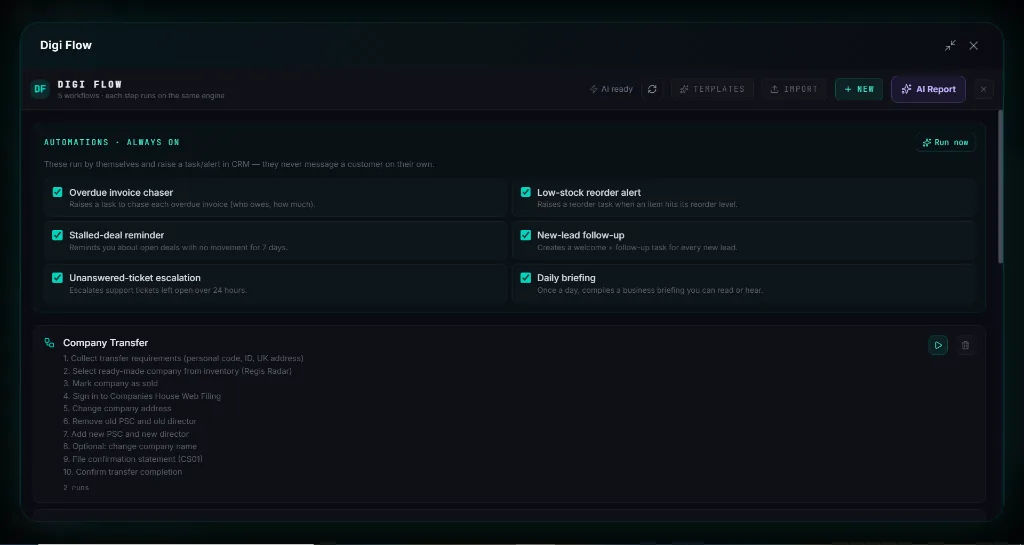
Pre-configured background monitors: Overdue Invoice Chaser, Low-Stock Reorder Alert, Stalled Deal Follow-Up, New Lead Welcomer, and Support Ticket Escalation that automatically raise actionable CRM tasks.
$ digi-biz-os --module="always-on-business-automations" --listen
✔ Module verified: SHA256 integrity passed. Local encrypted database mounted.
⚡ Voice Assistant standby in prompt box. Neural orchestrator attached.
Native C++ / Python Core
Runs offline on your hardware without subscription tokens.
DIGI Universal Bus
Coordinates with CRM, Studio & WhatsApp pipelines.
Engineered for Sovereignty, Speed & Power
Why settle for sluggish browser tabs and monthly subscription lock-in? See what happens under the hood of DIGI BIZ OS.
$ digi run --task="autonomous-dispatch" --target="digi-flow-&-always-on-automations"
[SYS] Loading native C++ modules... OK (12ms)
[AI-BRAIN] Reasoning pass complete: 90%+ modules connected.
[VOICE] Prompt box listening for user voice commands.
[SUCCESS] Operation completed without external network transmission.
Zero Cloud Latency & Terminal Power
Direct hardware access allows DIGI BIZ OS to manipulate local files, execute shell workflows, and coordinate database queries instantly — without waiting for cloud round-trips.
Multi-Agent Background Brain
Every task is planned by an intelligent reasoning core before a single line of code or script touches your operating system.
✔ 100% Offline native execution on your PC.
✔ No per-seat fees or recurring subscription traps.
✔ Sensitive client records never leave your local SSD.
✔ BYO wholesale AI keys or run free Ollama offline.
Direct Metal
Hardware accelerated video, AI & local database engines.
Private Disk
Zero diagnostic data or user telemetry uploaded.
Engineered for High-Consequence Work
Whether managing enterprise client ledgers, executing legal contracts, or rendering high-res media, DIGI BIZ OS operates inside a sovereign Windows desktop boundary.
Live Software Interface: Digi Flow & Always-On Automations
Explore actual screenshots of the running software. Every interface below is built natively into DIGI BIZ OS with zero cloud dependency and zero monthly subscription bills.
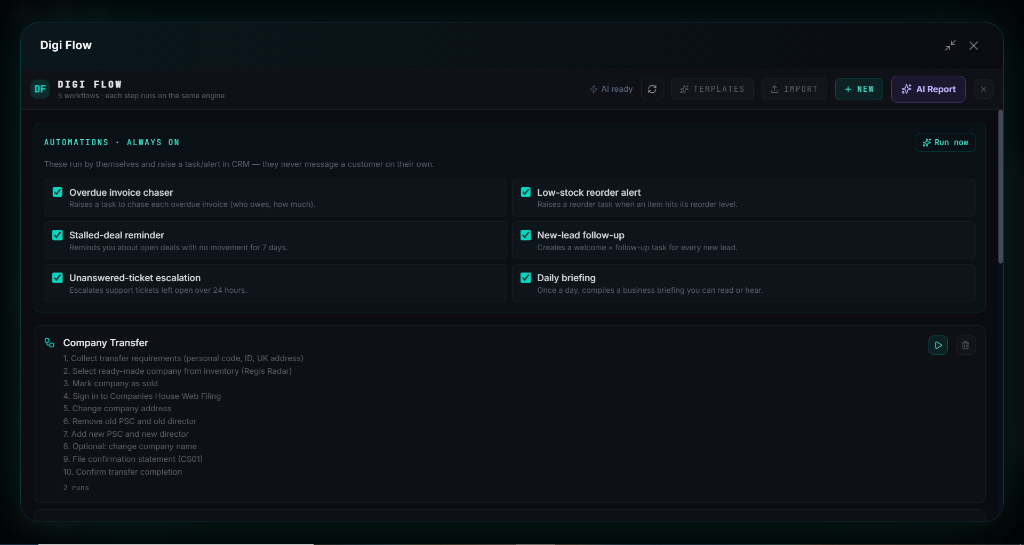
Always-On Autonomous Business Workflows
Scheduled cron routines, invoice chasers, and stock monitors
Configure visual triggers and automated multi-step actions that run 24/7 on your PC. Keep stock levels healthy, recover overdue invoices, and delegate tasks to AI subagents automatically.
How Digi Flow & Always-On Automations Executes in DIGI BIZ OS
End-to-end multi-step workflow automated entirely on your local PC.
Select Automation Rules
Toggle the always-on business monitors you want active (e.g. Overdue Invoices and Low Stock Alerts).
Define Custom Flows
Chain multi-step business actions (e.g. scan marketplace -> format data -> update CRM pipeline -> draft summary report).
Autonomous Background Execution
Digi Flow runs silently on your machine, logging all execution results and alerting you only when action is required.
How Digi Flow & Always-On Automations Compares to Expensive Paid Tools
Commercial SaaS vendors charge recurring subscriptions and per-minute rendering fees for these individual tools. With DIGI BIZ OS, every capability below runs natively on your Windows PC with 100% Free Lifetime Access.
| Market Paid Tool & Vendor | Commercial Cost | DIGI BIZ OS Native Capability | DIGI BIZ OS Price |
|---|---|---|---|
Zapier Pro & Make.com Zapier / Make | $30/mo ($360/yr) | Always-On Workflow Engine & Visual Builder
| 100% Free (Included)Save +$$360/yr |
Postman Enterprise & Tray.io Postman / Tray.io | $40/mo ($480/yr) | Universal MCP Client & API Connectors Hub
| 100% Free (Included)Save +$$480/yr |
Datadog APM & Cloud Telemetry Logs Datadog / New Relic | $60/mo ($720/yr) | Operations Center: 30-Event Real-Time Audit Stream
| 100% Free (Included)Save +$$720/yr |
Everything You Need to Know
Do always-on automations message customers without my knowledge?
No. By default, always-on automations raise high-priority tasks and alerts inside your Digi CRM dashboard so you maintain ultimate human oversight.
Can I run automations manually on demand?
Yes. Every always-on rule and custom flow includes a 'Run Now' button allowing you to perform an instant operational sweep at any moment.
What happens if a workflow step encounters an error?
Digi Flow immediately pauses the workflow, highlights the exact failed step, and preserves the error transcript so no corrupted actions occur downstream.
Related Business Modules in DIGI BIZ OS
Digi CRM
Receive automated tasks, invoice alerts, and pipeline updates generated by Digi Flow.
Digi Intelligence
Trigger automated market scans and supplier price checks on schedules.
Digi Marketing
Schedule social media publishing workflows across multi-channel queues.