Your Own JARVIS AI For Your PC and Your Business.
Most people who search for a JARVIS AI want the same thing: an assistant they can talk to that actually does the work instead of writing about it. DIGI BIZ OS is built for exactly that — a voice-first AI business operating system that listens, understands, plans, picks the right agent, skill or tool, executes on your computer and reports back.
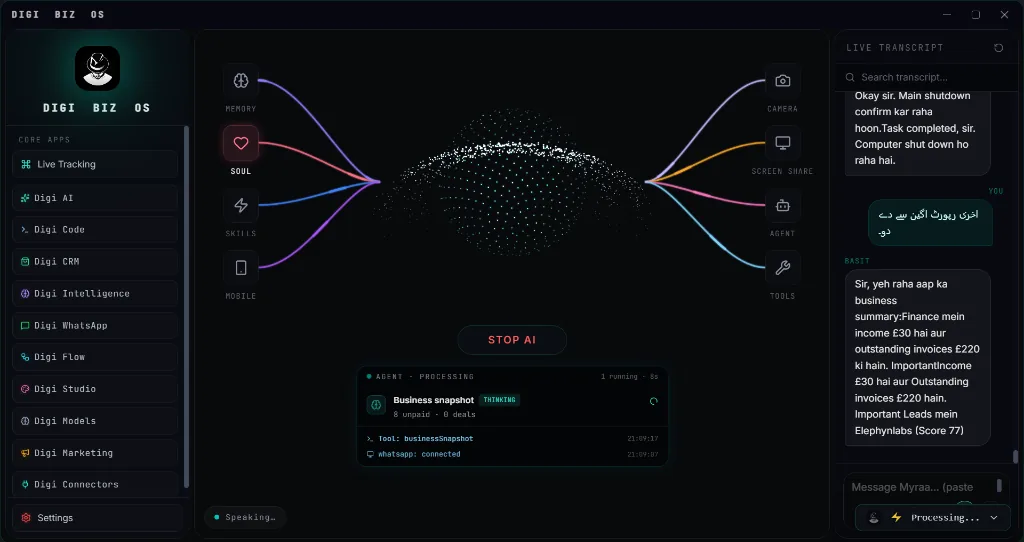
Experience JARVIS-Style AI In Action
Switch between capabilities below to inspect the live execution telemetry, parameter rules, and instant desktop output.
It listens
Voice-first control with live transcription, so you can brief it while you work.
$ digi-biz-os --module="it-listens" --listen
✔ Module verified: SHA256 integrity passed. Local encrypted database mounted.
⚡ Voice Assistant standby in prompt box. Neural orchestrator attached.
Native C++ / Python Core
Runs offline on your hardware without subscription tokens.
DIGI Universal Bus
Coordinates with CRM, Studio & WhatsApp pipelines.
Engineered for Sovereignty, Speed & Power
Why settle for sluggish browser tabs and monthly subscription lock-in? See what happens under the hood of DIGI BIZ OS.
$ digi run --task="autonomous-dispatch" --target="jarvis-style-ai"
[SYS] Loading native C++ modules... OK (12ms)
[AI-BRAIN] Reasoning pass complete: 90%+ modules connected.
[VOICE] Prompt box listening for user voice commands.
[SUCCESS] Operation completed without external network transmission.
Zero Cloud Latency & Terminal Power
Direct hardware access allows DIGI BIZ OS to manipulate local files, execute shell workflows, and coordinate database queries instantly — without waiting for cloud round-trips.
Multi-Agent Background Brain
Every task is planned by an intelligent reasoning core before a single line of code or script touches your operating system.
✔ 100% Offline native execution on your PC.
✔ No per-seat fees or recurring subscription traps.
✔ Sensitive client records never leave your local SSD.
✔ BYO wholesale AI keys or run free Ollama offline.
Direct Metal
Hardware accelerated video, AI & local database engines.
Private Disk
Zero diagnostic data or user telemetry uploaded.
Engineered for High-Consequence Work
Whether managing enterprise client ledgers, executing legal contracts, or rendering high-res media, DIGI BIZ OS operates inside a sovereign Windows desktop boundary.
How JARVIS-Style AI Executes On Your Machine
From voice instruction to local database write and final deliverable — with zero cloud lock-in.
Voice
speak naturally; the live transcript shows exactly what was heard.
Understand
the request is interpreted against your memories, personas and current workspace.
Plan
the work is broken into steps with the right agent, skill and tool selected per step.
Execute
steps run on your machine: files, apps, terminal, browser, documents, code.
Straight answers
- What is a JARVIS-style AI assistant?
- A JARVIS-style AI assistant is a voice-driven assistant that can understand natural instructions, plan multi-step work and then execute it using tools on your computer — rather than only answering questions in a chat window.
- Is DIGI BIZ OS a real JARVIS?
- DIGI BIZ OS is JARVIS-inspired, not the fictional Marvel system. It delivers the practical part of the idea: voice interaction, planning, multi-agent execution, extensive skills library, native desktop automation tools, desktop control, coding, documents and business automation in one app for Windows.
- What can it actually do?
- Speak a request and it can run workflows, schedule jobs, complete tasks, open and use applications, work with files and documents, write and run code, use the terminal and browser, and hand work to specialist AI agents.
Live Software Interface: JARVIS-Style AI
Explore actual screenshots of the running software. Every interface below is built natively into DIGI BIZ OS with zero cloud dependency and zero monthly subscription bills.
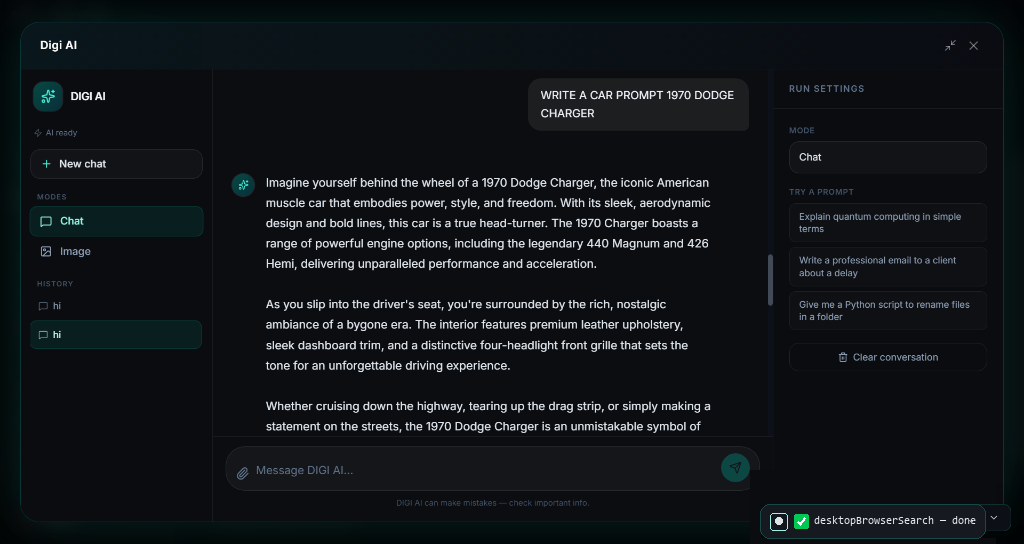
Conversational Multi-Model AI Chat & Document Reasoning
Chat with files, multi-turn reasoning, and local persona customization
Interact with top cloud models or fully offline local engines. Drop PDFs, codebases, or financial reports to extract insights, draft proposals, and generate action items with complete privacy.
Why Pay Subscriptions? JARVIS-Style AI Is Included 100% Free
Commercial SaaS vendors charge recurring subscriptions and per-minute rendering fees for these individual tools. With DIGI BIZ OS, every capability below runs natively on your Windows PC with 100% Free Lifetime Access.
| Market Paid Tool & Vendor | Commercial Cost | DIGI BIZ OS Native Capability | DIGI BIZ OS Price |
|---|---|---|---|
CapCut Pro & Adobe Premiere Pro ByteDance / Adobe | $20/mo ($240/yr) | Timeline Video Editor (Reels, Shorts, 4K Cuts)
| 100% Free (Included)Save +$$240/yr |
ElevenLabs Pro & Murf AI ElevenLabs / Murf | $22/mo ($264/yr) | Multilingual Voice TTS & Audiobook Factory
| 100% Free (Included)Save +$$264/yr |
HeyGen & Synthesia HeyGen / Synthesia | $29/mo ($348/yr) | AI Avatar Studio & Presenter Synthesis
| 100% Free (Included)Save +$$348/yr |
Descript Pro & Otter.ai Descript / Otter.ai | $12/mo ($144/yr) | Offline Speech-to-Text & Subtitle Generator
| 100% Free (Included)Save +$$144/yr |
Topaz Gigapixel & Photoroom Pro Topaz Labs / Photoroom | $13/mo ($156/yr) | AI Photo Studio & 4K/8K Image Upscaler
| 100% Free (Included)Save +$$156/yr |
Frequently asked
- Does it work on Windows?
- Yes. DIGI BIZ OS runs on Windows 10 and Windows 11. macOS, Linux and mobile versions are marked coming soon.
- Do I need to code?
- No. Voice and chat are the primary interfaces. Coding tools exist for people who want them.
- Is it a subscription?
- No. The core licence is a one-time lifetime payment. Source code and custom build licences are also available.
- Can I add my own skills?
- Yes. Custom skills, memories, tools, agents, workflows and tasks are all created inside the app.